SpongeBob Adventures: In A Jam
- 4.6
- Rating
- 10.00M
- Installs
- Free
- Price

 Analysis by App-foxy
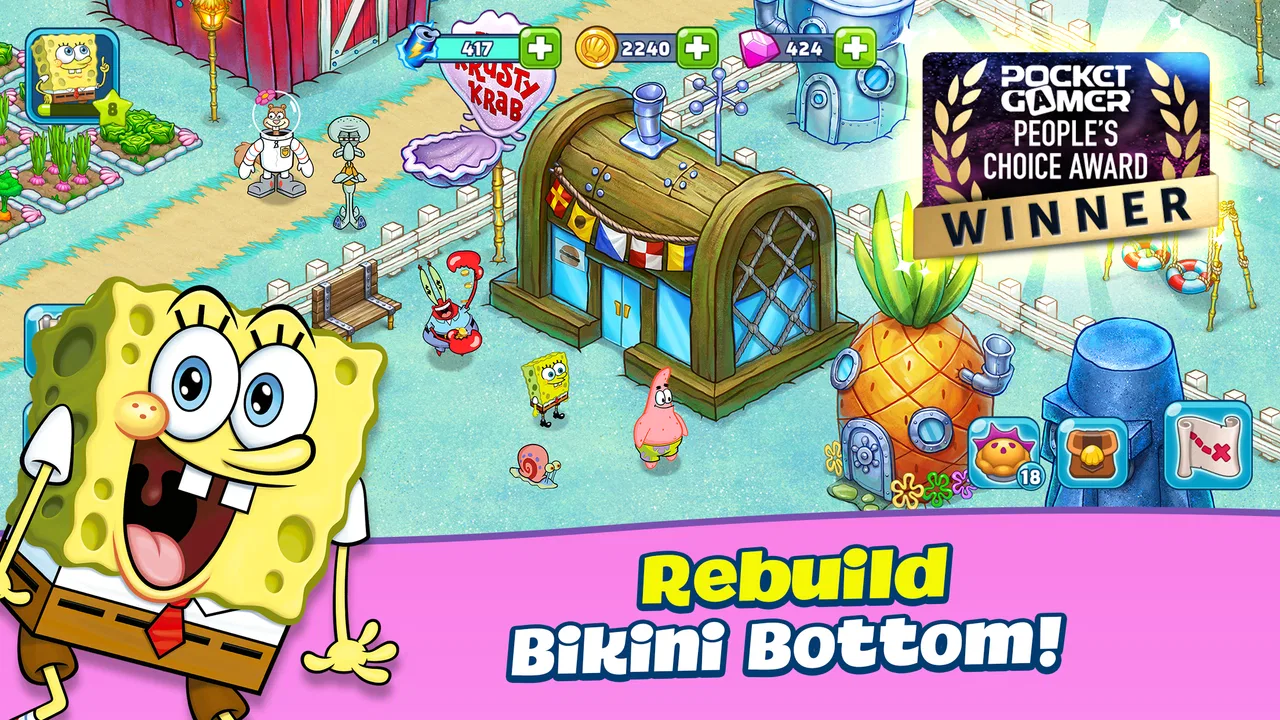
SpongeBob Adventures: In A Jam is the kind of mobile game I can imagine opening during a quiet break, then handing to someone else in the household because its bright SpongeBob setting is immediately inviting. It is a free simulation game from Tilting Point, built around restoring, building, and exploring a playful version of Bikini Bottom. My first impression is that it aims for relaxed progress rather than demanding reflexes, making it approachable for players who enjoy decorating, collecting, and gradually improving a world.
That friendliness is important on a shared device. One person may want to follow the story and explore, while another may simply enjoy checking the town, completing available tasks, or seeing what has changed. The game works best when everyone understands that progress belongs to the same play experience. It is not something I would treat like a separate profile for every member of a family unless the device and account arrangement already make that distinction clear.
The game carries an Everyone content rating, and that matches its cheerful presentation. Still, an age label does not automatically answer every household question. Younger players may need help understanding timers, purchases, and what happens when they tap through a prompt. I found the most comfortable approach was to let the child enjoy the creative side while an adult remains responsible for account and payment decisions.
You May Also Like

 Blood Strike: 2.5 Anniversary
Blood Strike’s Loadouts Turn Every Drop Into a Tactical Gamble
A close look at Blood Strike’s custom loadouts: how fast access to signature weapons reshapes its battle royale rhythm, rewards preparation, and narrows the gap between fights.

 Pandora - Music & Podcasts
Pandora’s Music Is Easy to Start, but Harder to Recover
Pandora’s strength is its low-effort path from a seed to a station. Its weak spot is how much confidence it asks you to place in connection, setup, and quiet recovery.

 8 Ball Pool
 Is Built on Rivalries, Rematches, and Routine
A close look at the rivalries, rematches, shared routines, and unanswered safety questions that turn a quick pool match into a persistent mobile community.

 Samsung Music
’s Quiet Strength Is Playing What You Already Own
Its reach comes less from spectacle than from dependable access to a personal library. That simplicity is both the app’s strongest retention engine and its ceiling.

 AccuWeather: Weather Radar
AccuWeather Review: A Quick, Clear Forecast for Everyday Decisions
For everyday plans, the best forecast is the one you can understand quickly. AccuWeather makes rain timing, radar, and local conditions easy to act on, with a few trade-offs.

 Hill Climb Racing
Why Hill Climb Racing Still Turns Crashes Into One More Run
A tiny car, a bumpy hill and one more upgrade: Hill Climb Racing keeps resurfacing because its simple chaos makes every near-miss feel personal.
More From Our News Desk



How the shared-world experience holds up
I look at shared play here as a question of rhythm: the game can suit a household where people take turns visiting the same SpongeBob world, but it works best when everyone knows who is making the next choice. That small bit of coordination keeps casual check-ins from turning into accidental changes. It also makes the next decision easier to enjoy, which is where the game’s gradual feedback and return visits come into focus.
A good fit for short visits and shared routines
The strongest everyday use case is a shared tablet or phone that several people check at different moments. Imagine one player starting a few building tasks before school, another looking around after work, and a parent checking the device later. That rhythm suits a game based on gradual world development better than a competitive title where one person’s session can directly spoil another person’s match.
I like that the SpongeBob theme gives the experience a clear emotional center. Familiar characters and colorful surroundings make the town feel more welcoming than an anonymous construction grid. Even when I was only making a small amount of progress, the setting gave the activity more personality. This is a useful distinction from many ordinary simulation games, which can become a spreadsheet of resources and upgrades without much charm.
There is also a natural reason to coordinate. If several people use the same device, it helps to agree on who is taking the next turn and whether anyone is in the middle of a task. A quick conversation prevents the common shared-device problem of someone changing a layout or spending a resource without realizing another player had a plan. The game does not need to be competitive for household friction to appear; ownership of decisions can still matter.
My practical advice is to establish a simple rule before installing it: one person handles purchases and account decisions, while everyone else can play within that boundary. That rule is more useful than assuming the bright art makes every tap harmless. It also gives children a clear answer when they ask whether they can unlock something immediately.
What makes it different from a standard building simulator
Compared with a typical city-building game, this one leans heavily on character recognition and exploration. The goal is not only to arrange structures efficiently. The SpongeBob world gives the tasks a sense of place, and that can keep younger or less experienced players interested when a purely economic simulator might feel dry.
Compared with a traditional adventure game, the pace is more patient. I would not choose it for someone who wants constant action, difficult combat, or precise controls. Its appeal comes from returning to a developing world, making decisions at a comfortable speed, and enjoying the theme. Players who already like idle or time-based progression games will understand the rhythm quickly, while action-focused players may find the waiting and repeated management less exciting.
It also differs from a simple coloring or character game because the player is expected to manage a growing environment. That adds a little responsibility: choices about what to do next have consequences for the pace of progress. I found that balance approachable, but not completely frictionless. The game is easy to start; getting the most satisfying results requires paying attention to priorities instead of tapping every available option immediately.
Boundaries that matter on a family device
The game is free to download, which makes trying it straightforward. It includes in-app purchases ranging from $0.49 to $119.99 per item, so I would not leave payment decisions ambiguous on a shared phone or tablet. The important household boundary is not whether the initial download costs anything; it is who is allowed to approve optional spending afterward.
I would also avoid treating one shared save as if it were a collection of private accounts. If the same game space is used by different people, everyone should accept that buildings, resources, and choices may reflect the group’s decisions. A child who wants a personal creative project may be happier using a separate supported setup, while a family looking for a communal activity can enjoy planning the town together.
Another useful boundary concerns session length. Because this is a progression-oriented game, it can encourage frequent checking. Setting a natural stopping point—after a task is chosen, an area is organized, or a short objective is completed—helps keep it from becoming an endless background habit. This is especially helpful for children who may interpret every available action as something that must be completed immediately.
On a shared device, I would keep the game’s account context visible to the adult who manages the device. I would not let a child experiment with account changes, store confirmations, or unfamiliar prompts. That is not a criticism of the game specifically; it is a sensible response to any free-to-play title with optional purchases.
Coordinating progress without taking the fun away
The best household arrangement is collaborative but not over-managed. One player can focus on exploring, another can enjoy arranging the town, and a younger child can choose characters or point out the next place to visit. Giving each person a role makes the shared world feel intentional rather than chaotic.
A small planning habit helps: before making a major choice, say out loud what the choice is meant to achieve. If someone wants to spend a resource to move faster while another person is saving for a new area, the disagreement becomes visible before the tap. This is one of the less obvious strengths of a character-based simulation: it creates simple opportunities for conversation without requiring the family to play at the same time.
I would be careful with the phrase “helping.” In a shared game, another player’s assistance can easily become unwanted control. An adult may know the most efficient route, but a child may value a funny arrangement or a favorite character more than efficiency. The game is more enjoyable when optimization remains optional. Letting a younger player make harmless aesthetic decisions can give them genuine ownership.
For siblings, alternating sessions is safer than alternating every few seconds. Frequent handoffs make it harder to remember what has been selected and can lead to accidental taps. A short turn also gives the next player something clear to do, such as checking the town or choosing an available activity, instead of taking over the entire direction of the game.
Age context and trust
The Everyone rating makes the game broadly approachable, and the colorful SpongeBob presentation should be comfortable for a wide range of players. In my view, the bigger question is not whether the theme is suitable; it is whether the player understands the difference between playing, waiting, and paying for convenience.
For a young child, I would introduce the game alongside an adult rather than simply placing it on a device and walking away. The first session is a good moment to explain that not every highlighted option needs to be selected, that progress can continue without rushing, and that purchase prompts require permission. Those lessons are practical and apply to the wider mobile-game environment too.
Older children and adults will probably appreciate having more freedom to decide how to develop the world. They may also notice the slower parts more clearly. If someone dislikes repeated resource management or wants every action to produce an immediate result, the game may feel less rewarding over time. Trust works best when expectations are honest: this is a relaxed simulation adventure, not a constant-action SpongeBob episode.
Because the game is installed on a device rather than played as a board game, account ownership and device access still matter. I would make sure the person who controls the device knows which account is being used and who can approve purchases. I would also avoid promising that each family member has an independent progress path unless the household has deliberately arranged separate play environments.
Where the game asks for patience
The main limitation is the nature of its progression. A world-building game can be satisfying because it develops slowly, but that same pace can test players who want immediate completion. I found it more enjoyable when I treated each visit as a small step rather than expecting a large transformation every time I opened it.
There is also a trade-off between convenience and patience. Optional purchases can make a free game easier to accelerate, but spending can weaken the satisfaction of planning and waiting. On a family device, this trade-off becomes a group decision because one person’s shortcut may affect how everyone experiences the shared world.
The game’s theme is another strength that can become a limitation. SpongeBob fans will likely get more from the setting, characters, and tone than players who feel no connection to the franchise. Someone searching for a deep, realistic simulation may prefer a more serious city or life-management game. Here, charm is part of the design, not a decorative layer added to a complex simulator.
I also would not recommend it as the only game for a household that wants competitive multiplayer, intense challenge, or a strong skill ceiling. Its value is in accessible progression and shared amusement. If the goal is to test reactions, compete head-to-head, or solve demanding puzzles, another category would be a better match.
Performance, version, and practical expectations
On the compatibility side, the game requires Android 8.0 or later. That makes checking the device’s operating system worthwhile before planning a shared installation, especially if the household uses an older phone or tablet. The current version is 2.35.1, so I would keep the installation updated through the normal app-store process to avoid unnecessary compatibility or bug frustrations.
The game has reached over ten million installs and holds a 4.6 average from around 130 thousand ratings, which suggests that its combination of licensed characters and casual simulation has broad appeal. Those figures do not change my personal recommendation, but they do place the game in a well-established part of the mobile market rather than making it feel like an obscure experiment.
Tilting Point is the developer behind the game. I would still judge it on the actual household experience: whether the pacing suits the player, whether the shared-device rules are clear, and whether optional spending is properly controlled. Popularity can indicate familiarity, but it cannot decide whether a particular family will enjoy the management loop.
Who should install it—and who should skip it
I would recommend it to SpongeBob fans who like gentle building games, players who enjoy checking a world in short sessions, and families that want a colorful shared activity without direct competition. It is especially suitable for someone who enjoys seeing gradual progress and making small decisions about what to do next.
I would be more cautious for players who dislike free-to-play mechanics, become frustrated by waiting, or want a complete experience with no purchase prompts. The wide purchase range makes adult supervision sensible, even though the game itself is free and rated for Everyone. Someone looking for a realistic simulation should also look elsewhere; the cartoon setting is central to the experience.
For a child with a strong desire for private progress, I would choose a setup that keeps their play separate from siblings or parents. For a family that enjoys discussing choices and sharing one colorful world, a common save can work well, provided everyone accepts that decisions are communal.
My household verdict
After spending time with it, I see SpongeBob Adventures: In A Jam as a friendly, approachable simulation game whose best quality is the way its familiar world makes routine building feel personal. It is easy to imagine a household returning to it in short visits, especially when one person wants to explore and another prefers organizing the town.
My recommendation comes with clear conditions. I would establish who controls purchases, explain that shared progress is not private progress, and agree on turn-taking before handing the device to a child. Those simple steps protect the relaxed tone that makes the game appealing. Without them, the same shared-world design can lead to accidental changes or disagreements.
In the end, I think it is a good choice for casual SpongeBob fans and families seeking a low-pressure activity, but not for anyone expecting fast action or a fully separate experience for every player. The free entry point makes it easy to try, while the patient progression and optional purchases mean it deserves a little household planning. Its strongest use is as a cooperative, easygoing world to visit together—not as a private competitive game or an unattended spending experience.
FAQs for SpongeBob Adventures: In A Jam
01What is SpongeBob Adventures: In A Jam?
SpongeBob Adventures: In A Jam is a casual adventure and simulation game set in the SpongeBob SquarePants universe. After a strange jelly-related disaster spreads across Bikini Bottom, players help SpongeBob and his friends rebuild familiar locations, complete quests, gather materials, and explore colorful areas. The game combines story-driven missions, resource management, decorating, and light puzzle-solving in a mobile-friendly format.
02How does the gameplay work in SpongeBob Adventures: In A Jam?
The main gameplay loop involves exploring different areas, collecting resources, completing tasks for SpongeBob characters, and restoring buildings or locations damaged by the jelly disaster. Energy is generally used to perform actions such as chopping, mining, harvesting, and clearing obstacles. As you progress, you unlock new areas, recipes, decorations, and characters, making the experience feel like a mixture of an adventure game and a relaxed town-building simulator.
03Is SpongeBob Adventures: In A Jam free to download and play?
SpongeBob Adventures: In A Jam can be downloaded and played for free, but it includes optional in-app purchases. These purchases may provide premium currency, extra resources, energy, or progress-related advantages. You can enjoy the story and complete many activities without paying, although progress may feel slower when energy or materials are limited. Parents should review device purchase settings if children may access the game.
04Does the game require an internet connection?
An internet connection is generally recommended, and some features may require the game to connect to its servers. Online access can be needed for loading certain content, synchronizing progress, receiving events, or processing purchases. Because requirements can change after updates, players should not assume that every part of the game will work offline. A stable connection also helps prevent problems when saving progress or downloading additional game data.
05Is SpongeBob Adventures: In A Jam suitable for children?
The game is designed around the family-friendly SpongeBob SquarePants brand, with colorful visuals, simple objectives, and lighthearted dialogue rather than realistic violence. However, it may include advertisements, optional purchases, timers, and mechanics that encourage continued play. Younger players may need assistance understanding resource limits and spending systems. Adults should check the current age rating, privacy information, advertising settings, and parental controls before allowing regular play.
Pros
- Colorful graphics capture the cheerful SpongeBob atmosphere.
- Familiar characters make the adventure appealing to series fans.
- Simple controls are easy for younger players to understand.
- Regular tasks provide clear short-term goals and rewards.
- Decorating Bikini Bottom adds a personal touch to progression.
Cons
- Energy limits can interrupt longer play sessions.
- Some upgrades and resources require considerable waiting.
- Progress may feel repetitive after completing similar tasks.
- In-app purchases can speed up progress for impatient players.
- A stable internet connection may be needed for some features.

SpongeBob Adventures: In A Jam
Gallery